Integrating Seamless 3D Cracks Texture Patterns into Your Creative Workflow
In the realm of digital design and physical crafting, a versatile asset like a 3D cracks texture pattern functions not as a final product, but as a foundational component. It’s a raw material inserted into a broader creative or production process, where its seamless, tileable nature becomes a critical operational advantage. Understanding where this asset fits—from initial concept to final output—is key to leveraging it efficiently across diverse projects.
The Role of Seamless Patterns in a Structured Design Process
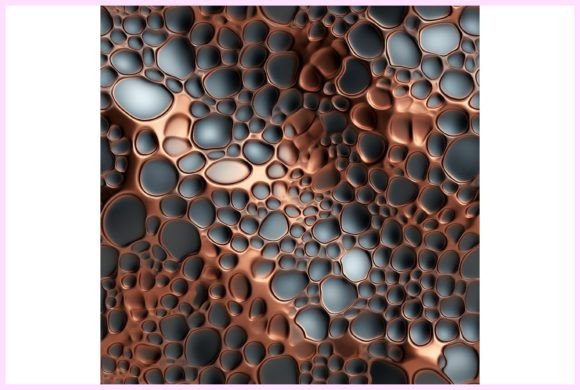
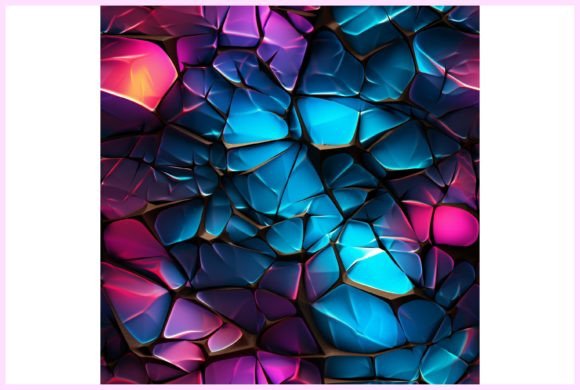
A seamless pattern is inherently a tool for repetition and consistency. For professionals, entrepreneurs, and hobbyists managing projects from web graphics to product packaging, the preparatory phase often involves sourcing assets that will not create technical hurdles later. A cracked texture seamless pattern with a high 2400x2400 px resolution and 300 DPI is selected during the resource gathering stage, before the core design work begins. This decision impacts everything downstream: a non-seamless texture would require tedious manual editing to cover larger areas, disrupting workflow efficiency and compromising consistency.
Consider a marketer preparing a campaign series. They might use this pattern as a unified backdrop for social media graphics, website banners, and printed stationery. By starting with a seamlessly tileable file, they ensure visual coherence across all platforms—a matter of brand quality control. The pattern interacts directly with design software (like Adobe Photoshop or Canva), printing specifications, and the physical properties of the final medium (textiles vs. paper). Its RGB color profile makes it immediately usable for digital outputs, while the high DPI ensures it remains sharp when the process shifts to physical Print on Demand products.
Practical Implementation Across Different Project Types
The application of a 3D cracks texture pattern is not a single task but a step integrated into various sequences. Its use dictates different preparatory actions and follow-up procedures.
For Digital and Web-Based Projects
When creating digital wallpapers, web graphics, or UI text effects, the workflow is predominantly digital. The designer imports the JPG file into their composition. Because the pattern is seamlessly tileable, they can use a simple “pattern fill” function to cover any canvas size instantly, a significant time-saving technique. This usability feature allows rapid iteration. A freelancer designing a website backdrop can test different scaling options without worrying about visible seams breaking the immersive 3D effect. The factor of organization here is simple: keeping a well-labeled library of such seamless assets prevents redundant searches in future projects.
For Physical Production and Crafting Workflows
Applications like sublimation print, scrapbooking, decoupage, and crafting DIY projects involve a transition from digital to physical. Here, the process includes an extra quality-control step: verifying the pattern’s scale and resolution against the target surface. Before printing onto notebook covers or textiles, a creator must ensure the 2400x2400 px dimensions are adequate for the item’s size, possibly scaling the pattern in their software while maintaining the 300 DPI for print clarity. This pattern often interacts with cutting tools, adhesives, and assembly steps. For example, in cardmaking, the printed cracked texture might be cut, layered, and combined with other elements—the pattern provides a consistent visual base that simplifies the assembly process.
Optimizing Long-Term Use and Integration
Beyond a single project, the long-term value of a high-quality seamless pattern lies in its reusability and compatibility. Educators creating teaching materials or bloggers developing branded content can archive this asset as part of a recurring visual theme. Integrating it smoothly into a routine involves a few practical observations:
- File Management: Store the pattern in a dedicated “Seamless Textures” folder within your asset library, alongside notes on its proven uses (e.g., “works well for dark text effects, sublimation on polyester”).
- Software Compatibility: Most design platforms accept high-resolution JPGs, but for advanced texturing in 3D software, you may need to convert the file format—a preparatory step worth documenting.
- Scale Testing: Before committing to a large print run for banners or wrapping paper, produce a small-scale test print to check color rendering and pattern alignment on the specific material.
This approach turns a single digital purchase into a persistent workflow tool, reducing the time spent sourcing new assets for similar projects in the future.
From Concept to Finish: A Workflow Example
Imagine a small business owner producing a line of themed merchandise. Their process might unfold as follows:
- Concept and Planning: Decide on a “fractured earth” theme for a new product series (t-shirts, stickers, digital wallpapers).
- Asset Acquisition: Select this 3D cracks texture pattern because its seamless, high-resolution properties meet technical requirements for all intended outputs.
- Design Execution: Apply the pattern as a background in t-shirt mockups, extract sections for sticker designs, and use it for text effects in promotional graphics. The seamless property allows uniform application across these vastly different canvas sizes.
- Production and Quality Control: Send the t-shirt designs to a sublimation printer, the sticker files to a cutter, and use the web graphics for an online store. The consistent texture creates a cohesive product line.
- Archiving: Save all project files with the pattern, noting its successful use. This creates a template for future seasonal collections, streamlining the next launch.
Throughout this workflow, the pattern interacts with decision-making (theme choice), other assets (logos, text), production partners (printers), and marketing platforms (the online store). Its role is operational, enabling consistency and efficiency.
Key Factors for Successful Integration
To incorporate a cracked texture seamless pattern without disruption, focus on its technical attributes as they relate to your process. The 300 DPI resolution is a benchmark for print readiness; the RGB color profile defines its digital use scope; the tileable feature dictates how you handle large surface coverage. For a productivity-minded user, these specs eliminate guesswork. Before starting a project, a quick checklist confirms compatibility: Is my target output physical? (Yes, use 300 DPI). Will I need to cover a large area seamlessly? (Yes, use the tile function). This pre-flight check is a simple but effective integration step.
Ultimately, a versatile digital pattern is a workflow catalyst. It reduces repetitive tasks, ensures visual uniformity, and adapts to multiple phases of a project—from initial digital mockup to final physical product. By treating the 3D cracks texture pattern as a process tool rather than just a visual element, creators and professionals can unlock systematic efficiency, allowing more time and energy to focus on the unique creative decisions that define their work.